
Arttron DevTools
Eight tools, all local
Everything below runs inside the extension: no account, no upload and no network request for the offline tools.
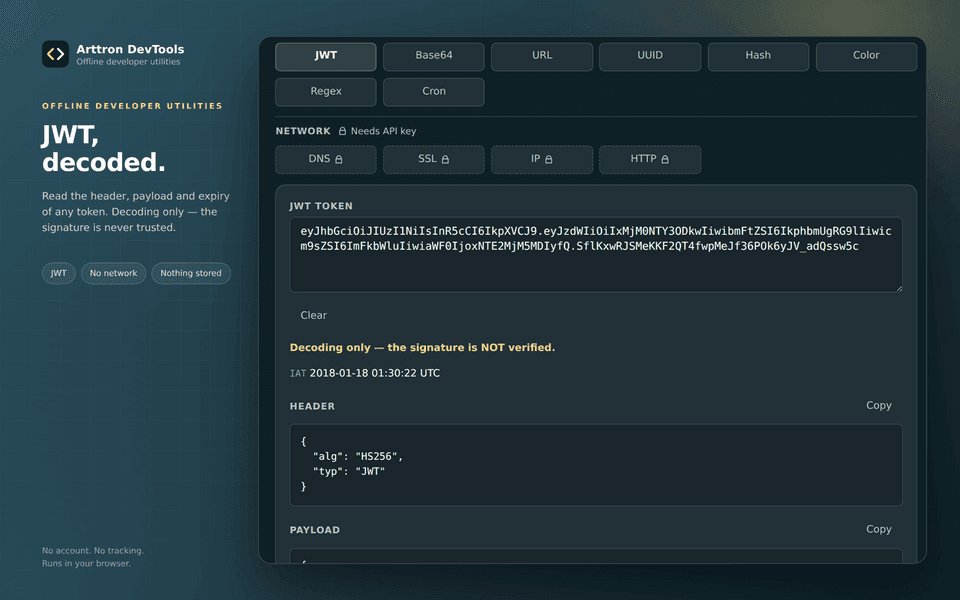
JWT decode
Read the header, payload and expiry of a token. Decoding only — the signature is never verified.
Base64 encode / decode
Convert text both ways, with the standard or URL-safe alphabet and full Unicode support.
URL parser
Split a URL into host, path, query parameters and hash, with percent-encoding decoded.
UUID v4 / v7
Generate time-sortable v7 or random v4 identifiers and copy them in one click.
Hash digests
MD5, SHA-1, SHA-256, SHA-512 and HMAC straight from the toolbar.
Color converter
Convert HEX, RGB and HSL and check WCAG contrast ratios before you ship a palette.
Regex tester
Try a pattern against sample text with flags and groups, protected by a timeout.
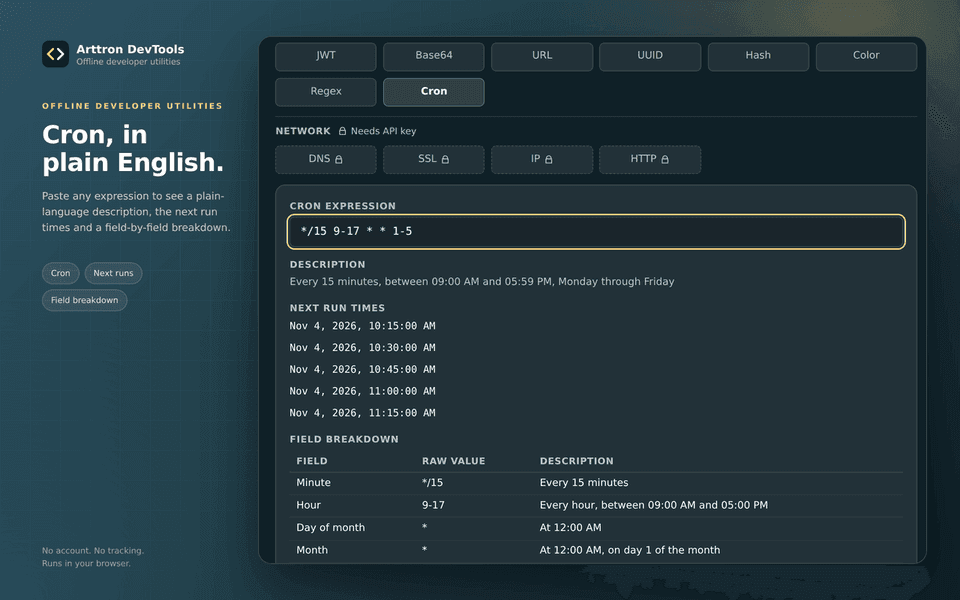
Cron explainer
Translate a cron expression into plain English with the next run times.
The eight offline tools process everything on your device. Nothing you paste leaves the browser.
Right-click actions on any page
Select text anywhere and send it to the right tool from the extension's context menu.
- Decode JWT
- Decode Base64
- Hash selection
Network tools for the current tab
DNS, TLS certificate, IP location and HTTP status checks for the host you are on. They use your own arttron.dev API key and send only the current tab's host, when you press a button.
Create an API key in the dashboard and paste it into the extension. Nothing is sent until you run a check.
Get started
1. Install
Add the extension from the Chrome Web Store or Firefox Add-ons. While the listing is in review the button shows Coming soon.
2. Pin it
Pin Arttron DevTools to the toolbar so it is one click away.
3. Open the popup
Pick any of the eight offline tools — it works immediately, with no account and no setup.
4. Connect network tools
Create an API key in your dashboard, paste it into the extension and grant the optional arttron.dev permission when you run your first check.
Privacy
The extension reads no page content. Offline tool input stays on your device; a network check sends only the target host and your API key, and only when you press the button.
What is Arttron DevTools?
Arttron DevTools is a browser extension for developers who lose time switching between decoder websites. It adds eight utilities to your toolbar — JWT, Base64, URL, UUID, hash, color, regex and cron — and each one runs locally inside the extension, so the values you paste never leave your computer. The popup stays open while you work, remembers the last tool and requires no account.
The extension also adds three context-menu actions for selected text and four optional network tools. DNS, TLS certificate, IP location and HTTP status checks call the same arttron.dev API as the website, using an API key you create yourself. Unlike the offline tools, these need the optional arttron.dev host permission, and they send only the current tab's host — only after you press the check button.
How to use the extension
- Install Arttron DevTools from the Chrome Web Store or Firefox Add-ons, then pin it to the toolbar.
- Open the popup and choose a tool; JWT, Base64, URL, UUID, hash, color, regex and cron work offline straight away.
- Select text on a page and use the right-click menu to send it to the matching tool.
- For network checks, create an API key in your arttron.dev dashboard, paste it into the extension and grant the optional permission.
Frequently asked questions
Does the extension send my data anywhere?
No. The eight offline tools process everything locally. Only the optional DNS, TLS, IP and HTTP checks contact arttron.dev, and only when you press the button.
Is the JWT signature verified?
No. The decoder reads the header and payload and shows the expiry, but it never verifies the signature. Treat a decoded token as untrusted data.
Which browsers are supported?
Chrome, Edge and Brave through the Chrome Web Store, and Firefox 140 or newer through Firefox Add-ons. The same code base ships both builds.
Do I need an account?
No account is needed for the eight offline tools. The optional network tools need an arttron.dev API key, which you create from your dashboard.
